1. Layout Optimization
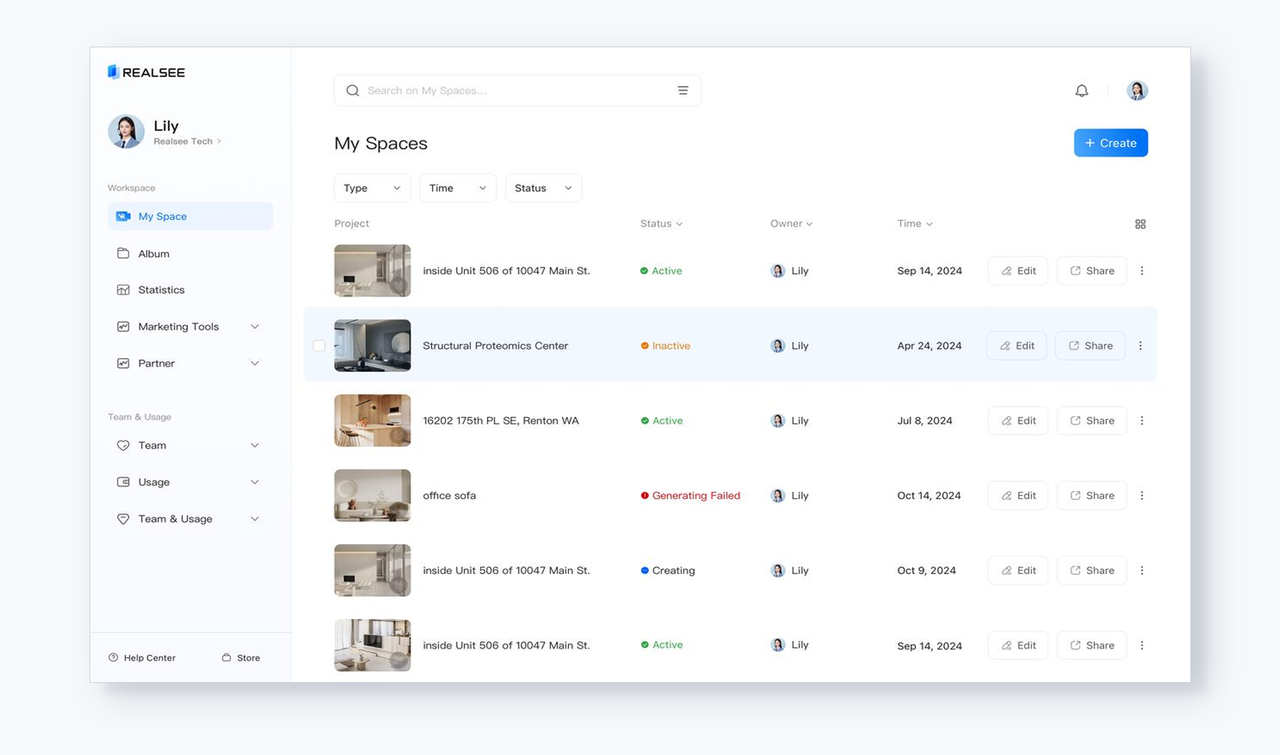
- New Interface: Frequently used functions and apps are now conveniently listed on the left side for easier access. For example, the Team & Usage feature has also been moved to the left sidebar for enhanced accessibility.

2. Quick Access to Help Center & Store
- A dedicated tool at the bottom of the left sidebar provides immediate access to the Help Center & Store, facilitating issue resolution and resource purchases.

3. Redesigned My Spaces
- Visual Improvements: The interface has been refreshed with cleaner visuals, enhancing readability and clarity.
- Streamlined Search and Filter: The Search function has been relocated to the top of the page, while filters are now more accessible, allowing for smoother navigation.

4. Paginator Optimization
- The paginator has been repositioned to the bottom of the page, enabling pagination while scrolling for improved usability.

5. New Hover Functionality
- Hovering over a row now clearly indicates the action being taken, reducing the likelihood of errors and enhancing information accuracy.