A guest has narrowed the search to two hotels. Both have beautiful interiors, appealing restaurants, and suites with impressive names. One costs more. What would help the guest decide whether the difference is worth it?
That is a useful starting point for luxury hotel marketing. Your website needs to give prospective guests enough detail to choose the right stay, from the room layout to what an upgrade actually includes.
The following seven ideas focus on the decisions between discovering your hotel and making a reservation. Start with the questions your reservations team hears most often, then build content that answers them before guests need to ask.
1. Turn Room Categories Into Clear Choices
“Deluxe,” “Premium,” and “Executive” may be familiar labels inside your hotel. For someone booking for the first time, they offer little explanation.
Review your room pages side by side. Can a guest quickly understand what changes between categories? Use the same information order on every page: sleeping arrangements, usable space, bathroom configuration, outdoor space, view, and included services.
Describe distinctions in practical terms. If a suite has a separate living room with a closing door, say so. If two categories have the same floor area but different terrace sizes, make that difference easy to find.
A useful comparison might look like this:
| Detail to compare | What the guest needs to understand |
|---|---|
| Living area | Whether it is separate from the bedroom |
| Terrace | Whether it fits seating, dining, or both |
| View | What is visible and from which part of the room |
| Connecting rooms | Which combinations can be requested and how availability is confirmed |
| Inclusions | Which services are included in the selected rate |
Keep photographs attached to the correct category. If rooms within a category vary, explain what is representative and what is guaranteed.
Start here: Ask reservations for the three room categories guests most often confuse, then rewrite those pages first.
2. Build a Dedicated Page Around One Valuable Booking Occasion
Choose an occasion your property can serve especially well: an anniversary weekend, a family reunion, or an extended villa stay.
Build the page around the decisions involved in that particular visit. For an anniversary weekend, guests may need to know which accommodation offers outdoor dining, whether dinner requires a separate reservation, and how to arrange a surprise before arrival.
Give the page a clear sequence:
- Explain who the stay is designed for.
- Recommend the relevant accommodation.
- Show a suggested itinerary using services the hotel actually offers.
- Clarify availability, inclusions, and advance booking requirements.
- Offer one next step, such as checking dates or contacting the concierge.
For example, a hypothetical coastal hotel could create an anniversary page featuring a terrace suite, dinner for two, and an optional private excursion. Each element should link to the information needed to arrange it.
Use this page as the destination for a matching campaign. A guest responding to an anniversary message should arrive at the anniversary offer, with the relevant details immediately visible.
3. Let Guests Explore the Hotel Before They Book
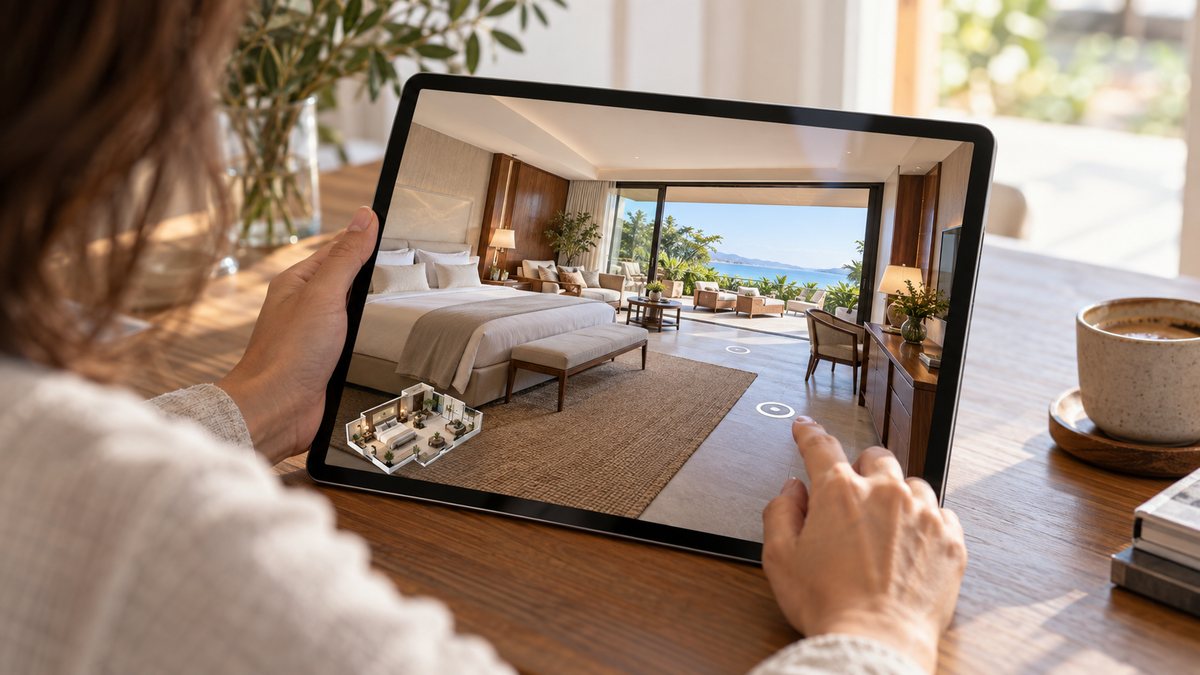
Consider a guest deciding whether a villa will work for a multigenerational trip. They may need to understand how bedrooms connect to shared spaces, where stairs appear, or how the living area opens onto the terrace.
Place a 3D virtual tour on the relevant accommodation page, close to its description and availability button. Introduce it with a specific invitation: “Explore the two-bedroom villa.”
Realsee supports interactive 3D tours, website embedding, shareable links, and labels that can add contextual information. Hotels can use these capabilities to help guests inspect a space while reviewing its details. [1]
Choose what to capture around the question you want to answer. A suite walkthrough can clarify a layout; a reception-area tour can introduce the setting guests will encounter on arrival.
Before publishing, check that:
- The tour clearly identifies the accommodation shown.
- The room is presented in a condition guests can expect.
- Any variation between the example and other rooms is explained.
- The tour works comfortably on mobile.
- Visitors can easily return to room details and check availability.
Provide verified written information for accessibility requirements; a visual walkthrough alone cannot establish whether a space meets a particular guest’s needs.
A Closer Look: Mandarin Oriental in 3D
What will it feel like to arrive? The Mandarin Oriental tour shown below offers a preview of the reception area, with warm lighting, textured wall finishes, and distinctive front desks.
An interactive view lets visitors take time to examine the design details and understand how they sit within the surrounding space. For a luxury hotel, this is an opportunity to make the arrival setting part of the online experience, alongside room information and photography.
Explore the tour below for a closer look.
Explore Mandarin Oriental in 3D
4. Explain the Upgrade at the Moment It Is Offered
An upgrade message should help the guest understand what the additional spend changes.
Imagine a hypothetical hotel offering a terrace suite above its standard suite. “Upgrade to more luxury” leaves the value unclear. A stronger description identifies the extra outdoor space, its seating arrangement, and any additional inclusions.
Coordinate the message across the room page, booking engine, and reservations reply. A guest should encounter the same room name, photographs, and explanation at every step.
Use a short comparison focused on the meaningful difference:
- What extra space or facility does the guest receive?
- How might they use it during their stay?
- What is included, and what requires a separate charge?
Keep the rate difference accurate for the selected dates. If an upgrade is subject to availability, explain when and how it will be confirmed.
Start here: Pick one upgrade path and review the entire journey from the first room comparison to the final booking selection.
5. Give Reservations a Visual Answer Kit
Some prospective guests will still want a conversation. Make that conversation easier to act on.
Create an internal reference with approved links for common questions: a room comparison, the relevant virtual tour, current dining information, transfer arrangements, and accommodation policies. Assign someone to maintain each resource.
A useful reply should address the question first, then provide the asset that helps the guest evaluate the answer.
For example, once the layout has been verified, a reservations agent could write:
“The bedroom and living room are separated by a door. You can explore the layout in this suite walkthrough. If you share your travel dates, we can check availability for that category.”
Keep the answer personal and specific. Sending an entire brochure for a single layout question creates extra work for the guest.
Record questions that repeatedly require a manual explanation. Those are candidates for the next website update.
6. Check the Handoff From Marketing to Booking
Walk through your own booking journey on a phone. Start with a campaign link, visit the accommodation page, and continue into the booking engine.
Look for places where the guest must repeat work or interpret conflicting information. Does the advertised room have a different name in the booking engine? Does “Check availability” open a general list of every room? Are package inclusions still visible when the guest selects a rate?
Where your booking system supports it, carry the chosen room, dates, or offer into the next step. When that is not possible, make the transition explicit and explain what the guest should select.
Keep service promises precise. If airport transfers require advance arrangement, put that condition beside the inclusion. If late checkout depends on availability, say so where the benefit is introduced.
Start here: Test one high-priority campaign from click to booking selection and fix the first point where the original offer becomes difficult to find.
7. Measure Whether Content Helps Guests Progress
Choose a commercial question before producing another asset. For example: “Will a clearer villa comparison help more visitors begin checking availability?”
For that test, define one primary outcome, such as the proportion of villa-page visits that lead to an availability search. Use supporting signals to understand what happened: comparison interactions, tour opens, room-specific inquiries, and completed bookings where tracking is reliable.
Separate engagement from booking impact. Longer visits may indicate interest, but they may also reflect confusion. Guests who choose to open a tour may already be more interested, so their booking rate alone does not prove the tour caused an improvement.
Where traffic allows, compare equivalent page versions over the same period. Otherwise, treat before-and-after results as directional and account for changes in rates, inventory, campaigns, and seasonality.
Keep the first test small enough to interpret. One accommodation category, one content change, and one primary outcome can provide a useful basis for deciding what to expand.
Make Your Most Important Room Easier to Explore
Choose one accommodation category that generates valuable inquiries or frequent questions. Give it a clear comparison, an accurate visual walkthrough, and a straightforward route to availability.
With Realsee, hotels can create and share interactive 3D views of their spaces, giving prospective guests an additional way to examine the accommodation before making a decision. [1]
Explore Realsee for Travel & Hospitality or contact our team to discuss a virtual tour for your property.
Frequently Asked Questions
What should a luxury hotel include on a room page?
Include accurate room-specific imagery, sleeping arrangements, layout details, views, outdoor space, occupancy information, rate inclusions, and a clear way to check availability. Explain meaningful differences from adjacent room categories.
Where should a hotel place its virtual tour?
Start with the accommodation page the tour represents. Place it near the room description or comparison section and keep the route to availability easy to find. Reservations teams can also share the same tour when answering relevant questions.
How can hotels promote suites without relying on discounts?
Explain the practical value of the additional space, layout, facilities, and included services. Help guests decide whether those differences suit their visit, while keeping pricing and conditions clear.
How should hotels evaluate new marketing content?
Set a primary outcome before launch, such as availability searches or qualified inquiries. Review engagement alongside that outcome, and account for other factors that affect bookings. Avoid treating views or time on page as proof of revenue impact.