

A small team needs to manage authority and accounts, like individual photographer logins, role-based permissions, clean client delivery and one dashboard for all project. This guide compares five platforms on exactly these points.
QUICK ANSWER
For a small team producing a high volume of 3D and 360° tours, Realsee is the strongest all-in-one choice. Because capture, editing, hosting and team management can be stored in one console.
It contains different roles:
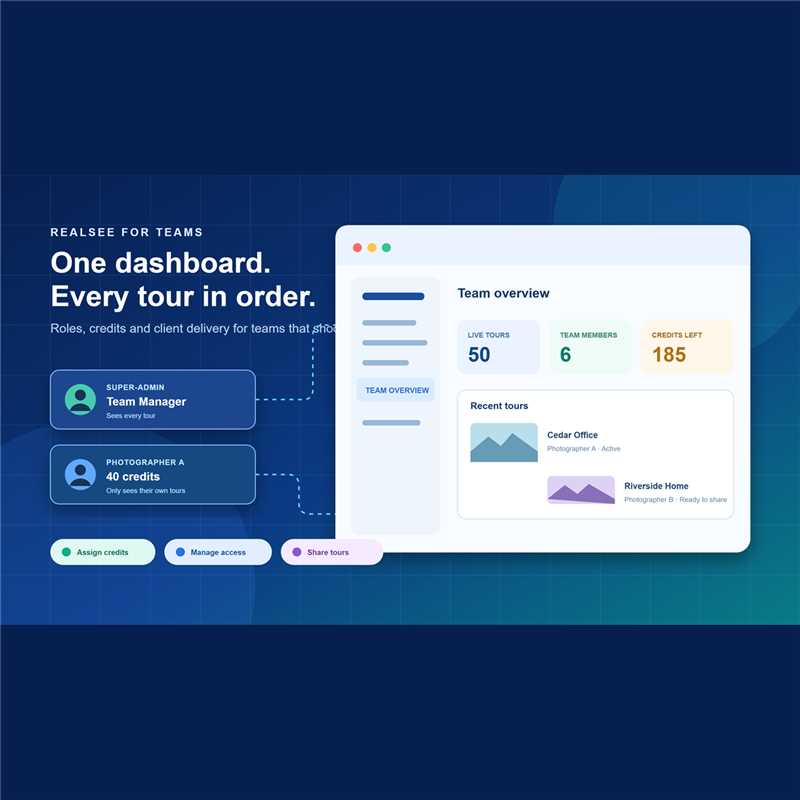
1.Each photographer gets their own login, members see only the projects they owned.
2. Managers with the Super-Admin role can see everything, and can allocate credits to any users in this team with a set amount and end date.
3.Pricing is pay-as-you-go with no mandatory base subscription.
1. Platform-by-Platform Breakdown
Realsee
- Team invitations at scale: invite users by QR code, link or email, assign each to a department, or batch-import a whole roster from a template.
- Roles and project visibility: members see only the projects they captured. Give a manager the Super-Admin role to see every project across the team.
- Per-photographer credit allocation: allocate a set amount of credits to a member. Besides, you can allocate the credits with expired date.
- Team-wide branding: set the company logo and links at team level, and apply VR contact details across projects. A tour can list multiple agent contacts.
- Client delivery: group a client's tours into one shareable Album link, or transfer a project to another user or team when the client ought to own it. Viewers can open a tour at no cost.
- Switch teams: one user can belong to several teams and switch teams.
- Hardware range: Galois M2 and Galois P4 LiDAR scanners (free 3D model generation), plus smartphone and 360° camera workflows.
Pricing: credit-based pay-as-you-go. Standard hosting is 1 credit per project per month, there is no mandatory base subscription, and credits stay valid for one year.
HDPhotoHub
- Team Member accounts with permissions set by the business owner.
- Separate client accounts, client groups with shared pricing tiers, and Group Admins for brokerages.
- Orders, schedules and property sites in one place.
- Limitation: a delivery and ordering platform. 3D tours come from a separate capture platform. Pricing is per-property credits.
RICOH360 Tours
- Owner, Admin, Member and Limited Member roles.
- Limited Members access only tours they are assigned to or authorized for. Admins can reassign tours.
- Team features sit on the Business plan, priced per member.
- Limitation: recurring subscription and a 360° camera workflow, without survey-grade LiDAR capture.
PanoCool
- White-label domain and per-tour custom domains on the Super Cool plan.
- Per-project "Can view" or "Can edit" access, up to 10 people per project.
- Project transfer to clients (both accounts need Super Cool).
- Limitation: no separate client dashboard, only the project owner can invite, and access is managed project by project.
Matterport
- Account Owner, Admin, Collaborator and Billing Contact roles.
- Folder-based access per collaborator. Custom roles are an Enterprise feature.
- Only admins can invite new users.
- Limitation: subscription tiers capped by Active Spaces, so keeping many client tours online pushes you into higher tiers.
3. Team Management Comparison Matrix (2026)
| Capability | Realsee | HDPhotoHub | RICOH360 Tours | PanoCool | Matterport |
|---|---|---|---|---|---|
| Photographer logins | Yes, with departments and batch import | Yes | Yes | Yes, per project | Yes |
| Default photographer visibility | Own captures only; Super-Admin sees all | Owner-defined permissions | Limited Member sees assigned tours | Only shared projects | Folder-based |
| Budget control per member | Credit allocation with end dates | Not the focus | Per-member seat fees | Not the focus | Account-level subscription |
| Client delivery | Share links and albums, project transfer | Client accounts and Group Admins | Share links | Client invites, transfer | Share links, transfer |
| Built-in capture hardware | Galois M2 and P4 LiDAR, plus phone and 360° cameras | None | 360° cameras | None (bring your panoramas) | Pro2, Pro3, phone, 360° cameras |
| Pricing model | Pay-as-you-go credits, no base fee | Per-property charge credits | Subscription | Subscription | Subscription capped by Active Spaces |
Based on each vendor's public help documentation as of November 2026. Plans and features change, so confirm current details with each vendor.
4. Running a Team on Realsee
The diagram below shows how roles, credits and projects fit together inside one Realsee team account.

Here is a typical Realsee Console setup for a team of five photographers and one operations manager:
- Invite the roster. Use the batch import template to add names, departments and emails in one upload. Departments can map to regions or service lines.
- Set roles. Keep freelancers as Members so they only see their own captures. Give the operations manager the Super-Admin role to see every project.
- Allocate credits. Assign each photographer a credit budget with an end date. The Allocation view shows usage and balance per person.
- Brand once. Set the company logo, links and VR contact details at team level so every tour leaves the team looking the same.
- Deliver by client. Bundle each client's properties into an Album with one link, or transfer finished projects to the client's own Realsee account.
- Match hosting to contracts. Set a fixed active period per project, or enable monthly renewal, and write the hosting term into each client quote.
Why Pay-As-You-Go Matters for Teams
Per-member or Active Space subscriptions grow with headcount and archive size. Realsee has no mandatory base subscription: credits go to generation, hosting and downloads for actual projects, and inactive projects stop using hosting credits. Spending follows the projects that are live.
Handoff Tip: Transfers Require Inactive Projects
Realsee transfers projects between users or teams only when the project is set to inactive. Plan a short offline window before handing a tour to a client, or deliver through an Album link if the tour must stay live.
5. The Verdict: Which Platform Fits Your Team?
WHERE REALSEE FITS BEST:
- One console for the whole tour pipeline: capture, editing, hosting, team roles and credit budgets in the same place.
- Freelancer-heavy teams: photographers see only their own work by default, without extra configuration.
- Cost control per shooter: credit allocation with end dates instead of open-ended seat licenses.
- Mixed capture needs: LiDAR for commercial and large spaces, phones and 360° cameras for quick residential jobs.
WHERE OTHER PLATFORMS FIT BEST:
- HDPhotoHub: you need client ordering, scheduling and invoicing. It also pairs well with Realsee: HDPhotoHub for the business side, Realsee for capture and tours.
- RICOH360 Tours: your team shoots only with 360° cameras and prefers a per-member subscription.
- PanoCool: every tour must open on your own white-label domain.
- Matterport: a client contract requires a Matterport-hosted URL.
Frequently Asked Questions
Can each photographer have a separate login on Realsee?
Yes. Admins invite members through the Realsee Console by QR code, invitation link, email, or batch import. Each member signs in with their own account and can be assigned to a department.
Can photographers see each other's projects on Realsee?
Not by default. Team members see only the projects they captured. An administrator can assign the Super-Admin role to managers who need access to every project in the team.
How do I control how much each photographer spends?
In the Usage section of the Realsee Console, allocate a specific number of credits to a member with an end date. The Allocation view lists each member's usage, balance and package status.
How do I deliver tours to different clients from one Realsee account?
Share each tour's link, group a client's tours into a single Album link, or transfer projects to the client's own Realsee account. Viewers do not pay to open a tour.
Does Realsee charge per seat or per team member?
Realsee uses pay-as-you-go credits with no mandatory base subscription. Credits cover generation, hosting (1 credit per project per month as standard) and selected downloads, and they stay valid for one year.
What is the best platform for a small team managing many photographers and clients?
For teams whose main product is 3D or 360° tours, Realsee keeps capture, hosting, roles and per-photographer budgets in one console. Teams that also need client ordering and invoicing often add HDPhotoHub for the business side.
Sources: Realsee Team Members Invitation · Realsee Project Visibility · Realsee Usage & Allocation · Realsee Albums · Realsee Pay-As-You-Go · HDPhotoHub Account Types · RICOH360 Tours Roles · PanoCool Agency Guide · Matterport Collaborators