Learn the geometric mechanics behind internal sensor baseline parallax, essential capture spacing rules, and automated cloud algorithms for survey-grade point clouds.
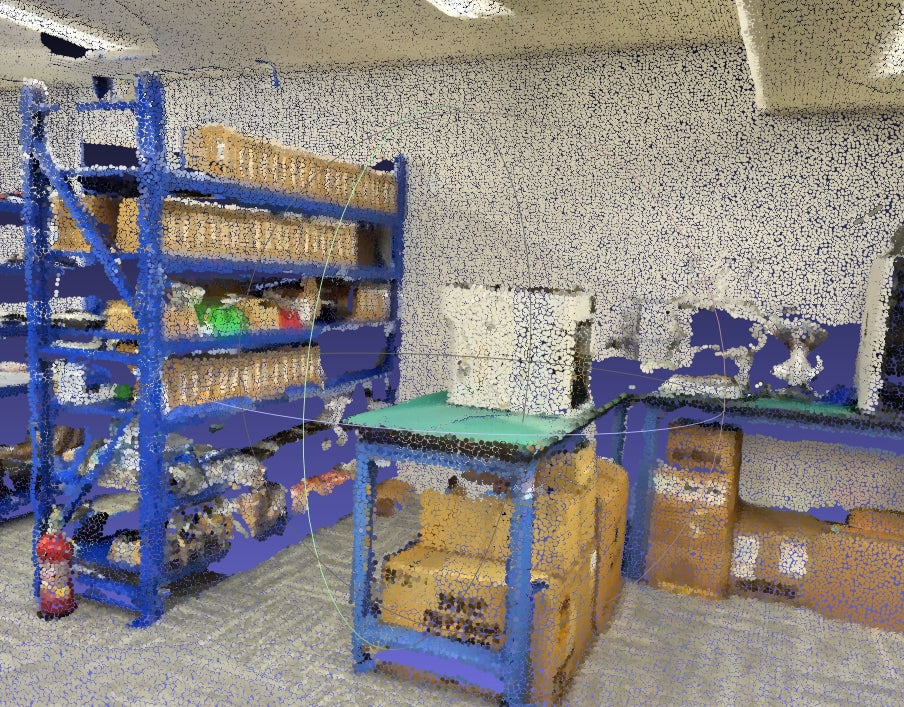
You wrap up a multi-room industrial capture with your Realsee Galois 3D LiDAR Scanner, process the dataset, and import the resulting .E57 file into Autodesk ReCap or CloudCompare to verify tolerances—only to spot blue halos leaking from warehouse racks onto the white wall behind them, or table legs casting jagged discoloration onto concrete floors.
In 3D spatial scanning, this defect is known as point cloud color bleeding (or parallax occlusion ghosting). It is a frequent point of friction when handing over raw point clouds to BIM modelers and CAD technicians.
This practical field guide unpacks the physical mechanics of this phenomenon inside the integrated Galois hardware, outlines our official field capture spacing specifications, and shows how our cloud reconstruction engine eliminates these artifacts completely.
1. Anatomy of the Artifact: What Are You Seeing?
Before optimizing field habits, field operators must distinguish true parallax color bleeding from sensor noise or registration misalignment.

Look for these two distinct visual signatures in your point cloud slices:
- Foreground-to-Background Halos: Background surface points near sharp boundaries (e.g., behind shelving posts, window frames, or pipe networks) erroneously inherit the color of the foreground obstacle.
- Exposure Stepping across Overlaps: Floors and ceilings scanned between adjacent setups exhibit stepped brightness lines due to shifting ambient light levels.
2. The Root Cause: Internal Sensor Baseline Offset
The Realsee Galois is an advanced all-in-one spatial scanner integrating a high-precision LiDAR measurement module alongside a dedicated 4/3-inch large-sensor optical imaging module. However, because both sensors cannot occupy the exact same physical coordinates within the housing, an internal physical baseline offset exists.
The Occlusion Trap: The LiDAR pulse shoots past the edge of a narrow metal pillar to register a coordinate on the back wall at 5 meters. But from the perspective of the optical camera lens located just centimeters away, the metal pillar blocks the line of sight to that wall point. If software performs a direct back-projection without testing for occlusion, it paints the wall points with the pillar’s blue pixels.
3. Official Galois Capture Distance Guidelines
Field scanning geometry directly dictates whether the optical module has clear lines of sight around obstacles. Follow these official Realsee Galois distance benchmarks on site:
Official Galois Field Specifications
- Standard Indoor Spaces: Place a capture point every 3 to 8 meters to maintain optimal point density and seamless walk-through alignment.
- Complex or Repetitive Environments: In high-density warehouse aisles, narrow equipment rooms, or dense racking, place a capture point every 2 to 3 meters. This delivers unobstructed multi-angle visibility around structural columns.
- Outdoor Spaces: Ensure scan setups are spaced no more than 8 meters apart to ensure reliable loop closure and prevent edge fallout.
Additional Field Capture Disciplines
Avoid Oblique Sightlines
Do not position the tripod at grazing angles to thin vertical posts. Perpendicular views maximize visibility behind structural members.
Maintain Uniform Ambient Light
Avoid stationing where one setup faces blinding exterior glare and the next sits in deep shadow, keeping exposure shifts gentle.
4. How the Realsee Galois Processing Pipeline Fixes It
Even with disciplined 2–3 meter spacing, complex geometry makes physical baseline occlusion inevitable. This is where Galois cloud reconstruction software steps in:
- Voronoi Mesh Ray-Penetration Tests: The system builds a local mesh collision proxy for each point cloud chunk. It casts virtual rays from laser points to camera centers. If a ray intercepts a foreground triangle, that camera view is pruned, ensuring background points never absorb foreground color.
- Global Photometric Gain Balancing: Solving a sparse linear matrix balances overall exposure across every station, wiping out harsh illumination boundaries.
- Multi-Band Pyramid Blending: Decomposing texture maps into 4 frequency octaves allows smooth blending of ambient illumination while locking sharp structural edges to maximum-weight single-view masks.

5. Point Cloud Quality Checklist Before Client Hand-off
- ☑ Edge Cleanliness: Are thin metallic frames, door jambs, and pipes free of color smearing onto adjacent walls?
- ☑ Seam Consistency: Do multi-station overlaps transition smoothly without stepped exposure lines on flat slabs?
- ☑ Under-Desk & Shadow Detail: Are recessed shadow regions clearly legible without noise crushing?
- ☑ Deliverable Format: Is your .E57 or .PLY point cloud export CAD-ready without requiring manual noise slicing?