

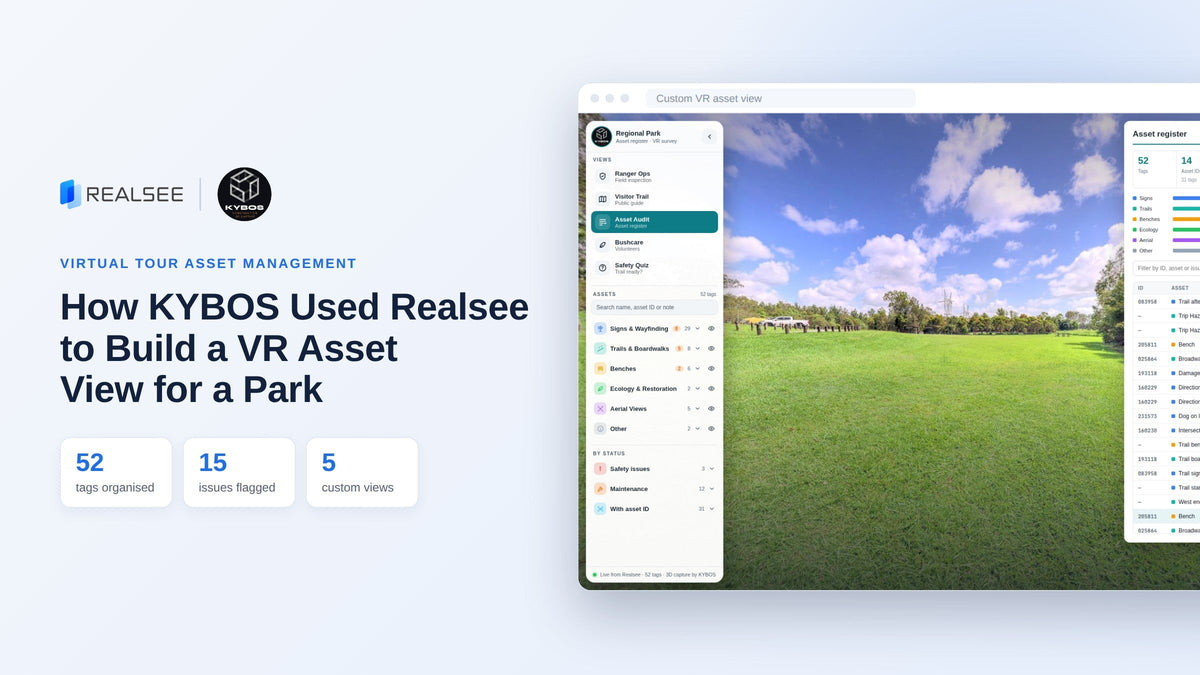
KYBOS, an Australian laser scanning and 3D capture company, worked with Realsee to turn a 3D virtual tour of a regional park into a custom asset management view. Using the Realsee Developer API, the team organised 52 tags already placed in the tour into searchable asset categories, flagged 15 issues (3 safety, 12 maintenance), and built five views for different park users, all running on the tour's live data.
Key facts
| Capture partner | KYBOS (Kingscliff, NSW, Australia) |
| Site | A regional park managed by a local government client |
| Tour size | 214 capture points |
| Tags in the tour | 52 |
| Asset categories | Signs, trails, benches, ecology, aerial views and other |
| Issues identified | 15 (3 safety, 12 maintenance) |
| Unique asset IDs | 14 |
| Custom views | 5 |
| Built with | Realsee Developer API, Realsee Immersive VR Starter, Five SDK |
The challenge: a virtual tour full of data nobody could sort
KYBOS captured the park as a 3D virtual tour and added 52 tags while on site. The tags covered signs, trails, benches and ecology notes, and many included asset IDs and condition notes such as "trip hazard" or "needs pressure cleaning".
That information was valuable, but in a standard tour viewer it was just a set of hotspots. An asset manager couldn't filter by issue, a ranger couldn't follow an inspection route, and nobody could see at a glance which assets needed attention.
The solution: custom views built on the tour's own tags
Realsee built a custom interface, or "skin", on top of the tour using the Realsee Developer API. Instead of adding new data, it reorganised the tags KYBOS had already captured.
A vertical asset menu
- SearchFind any of the 52 tags by name or note.
- Browse by categorySee the asset ID and notes for each tag.
- Filter by statusSafety · 3Maintenance · 12With asset ID · 31 tags
- Show, hide or fly toToggle each tag in the 3D scene, or click it to fly straight to its location.
Five views for five audiences
Ranger Ops
Park rangers
A safety-first, 15-stop inspection route, with each stop marked as checked.
Visitor Trail
Visitors
The same trail presented as a guided story.
Asset Audit
Asset managers
An asset register organised by asset ID.
Bushcare
Conservation volunteers
An ecology and restoration view.
Safety Quiz
Staff training
A game where users find real hazards inside the real scene.
One dataset
Always in sync
All five views read the same live tags. When a tag is updated in Realsee, every view updates too.
Try the interactive demo
Explore the park in 3D, open the asset menu on the left, and switch between the five views.
Interactive demo built with the Realsee Developer API. 3D tour captured by KYBOS. Open the demo in full screen.
How it was built
- Connect the tour. The team started from the official Realsee Immersive VR Starter, a React and TypeScript template, and connected it to the Realsee Developer Platform.
- Read the tags. A read-only server route fetches the tour's tags through the OpenAPI, including names, descriptions and 3D positions.
- Sort the data. Tags are grouped by what they describe, and issues and asset IDs are detected from the tag notes.
- Design the views. Each view presents the same data for a different user.
- Publish securely. A serverless function requests freshly signed tour data on every visit. API keys stay on the server and are never exposed in the browser.
The result
"This is one of the biggest features I have been waiting for. Every tag I add on site now shows up in an asset register and an inspection route our clients can actually use. This takes 3D capture to the next level."Louis Pont, Founder, KYBOS
KYBOS now has a working example of a 3D virtual tour used as an asset management tool. It shows the issues, asset IDs and inspection routes that sit inside an existing capture, and it can be shown to local government asset teams. For the wider picture, read our guide to virtual tour asset management for parks and public spaces.
About KYBOS
KYBOS is an Australian laser scanning and 3D capture company based in Kingscliff on the Tweed Coast, NSW. It documents construction sites, buildings, assets and public spaces across the Gold Coast, Brisbane and Northern NSW, and works with Realsee in Australia.
Want this for a park or public space in Australia? Talk to KYBOS.
TEL: +61 451 052 500
WEB: kybos.au
What this does and doesn't do
FAQ
Can a 3D virtual tour be used for asset management?
Yes. If assets are tagged in the tour with IDs and condition notes, those tags can be filtered, searched and mapped to locations in 3D. In this project, 52 tags became an asset register with 14 asset IDs and 15 flagged issues. Learn more in our virtual tour asset management guide.
Do I need to re-capture a site to build a custom view?
No. This project used the tags KYBOS had already placed in the tour. The custom view only reorganises existing data.
Can I customise a Realsee virtual tour interface?
Yes. The Realsee Developer Platform provides an OpenAPI and an official Immersive VR Starter template for building custom interfaces. Our step-by-step Developer API tutorial shows how this project was built.
Is the tour data secure when it's published?
Yes. Realsee tour data is signed, the signature expires after a short time, and it only loads on domains approved in the developer console. API keys stay on the server.
Who can use this approach?
Capture providers, facility managers and local government teams who already use Realsee tours and want to see assets, issues and inspection routes in one place.
Can Realsee help build a custom VR skin for my project?
Every project is different, so start with a conversation. Tell Lutina from the Realsee team what your tours and clients need, and we will help you work out the best way to build it with the Realsee Developer API. Reach her on WhatsApp.
Build your own custom tour view
Turn your Realsee tours into custom views with the Developer API, or talk to Lutina about your project.