How a question from the field helped the Realsee team improve point cloud edge clarity and color consistency.
The practical test of spatial technology happens on customer job sites, where complex geometry, occlusions, and changing lighting conditions challenge the entire capture and processing workflow.
A message in our technical support group brought one such challenge into focus:
“打扰你,客户说相机和 LiDAR 的视差,有偏离点云而变色的现象,这个正常吗”English translation: “Sorry to bother you. The customer has noticed discoloration in the point cloud, apparently caused by parallax between the camera and LiDAR. Is this normal?”
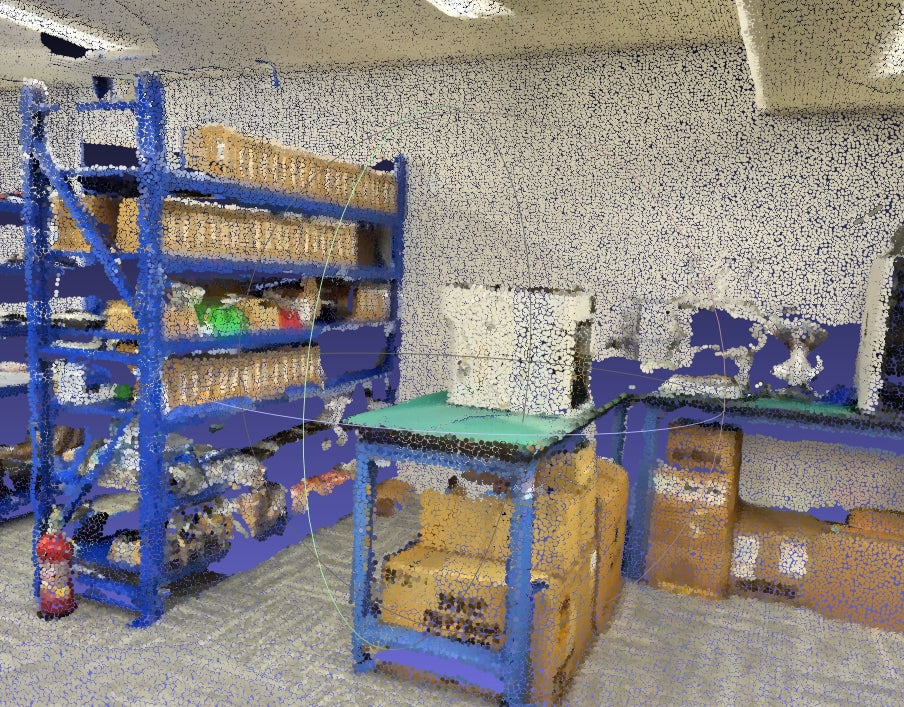
The feedback concerned a warehouse scan where blue metal storage racks stood in front of light-colored walls. Around some depth boundaries, colors from foreground objects appeared on background points.

Redefining “Industry Normal”
Camera-LiDAR parallax is a technical challenge, but recognizing its cause is only the starting point. The next question is how the processing pipeline handles it.
Because a camera and a LiDAR sensor observe a scene from different positions, they do not always see the same surfaces. A background point visible to the LiDAR may be hidden behind a foreground object in the camera image. If color assignment does not account for that difference, the background point can receive the foreground object’s color.
For the Realsee Galois engineering team, this feedback was a reason to investigate the dataset—not simply dismiss the result as normal. The goal was to improve color assignment around occlusions while preserving the captured geometry.
Diagnosing the Root Cause in the Field Dataset
The algorithms team examined the customer’s dataset to understand where color assignment and visual consistency were breaking down. The warehouse scene provided a useful example: narrow blue shelf pillars, light-colored background walls, and areas of shadow created clear boundaries for inspection.

The analysis focused on two related issues:
- Occlusion-related color assignment: A wall point captured by the LiDAR could project onto a blue shelf pillar in a camera image taken from a different position. Without an appropriate visibility check, the wall point could be assigned the pillar’s color.
- Color and exposure inconsistency: Images from different capture positions could vary in brightness and color, creating visible transitions when combined on the same surface.
The Engineering Response: Three Areas of Improvement
The response focused on visibility handling, exposure consistency, and color blending. Rather than treating the problem as a reason to blur the result, the team worked on how source images were selected and combined.
What Changed in the Colorization Workflow
- Local visibility checks: Local mesh-based visibility tests help identify camera viewpoints where foreground geometry obstructs a background point. Those obstructed views can then be excluded from color assignment.
- Photometric gain compensation: Exposure balancing across capture positions helps reduce brightness differences between overlapping source images.
- Multi-band blending: Blending at different spatial scales helps smooth broad lighting transitions while retaining local visual detail.
The Transformation: Clearer Edges and More Consistent Color
Reprocessing the customer’s dataset provided a way to inspect the changes in the same warehouse scene.

In the illustrated areas, the blue spill on the background walls was reduced, shelf boundaries appeared more distinct, and lighting transitions looked more consistent.
These results illustrate improvements to point cloud appearance in this dataset. They should not be interpreted as a separate validation of dimensional accuracy or a guarantee that every scan will require no additional review.
Why User-Driven Engineering Matters
Hardware specifications describe only part of a spatial capture workflow. The software that registers images, evaluates visibility, and assigns color also shapes the quality of the final deliverable.
This case shows why feedback from real projects matters. A question raised by a customer became a concrete dataset for diagnosis, processing improvements, and visual comparison.
For teams evaluating Realsee Galois, the practical takeaway is to assess both the capture hardware and the resulting data. Inspect representative scenes, review difficult boundaries, and check whether the deliverables meet the needs of your downstream workflow.